Order types, and why your stop did not do what you expected
Four order types cover almost everything a discretionary futures trader places, and the differences between them only become visible on the days you least want a surprise. Here is what each one promises, and what it does not.
The four, and what each protects
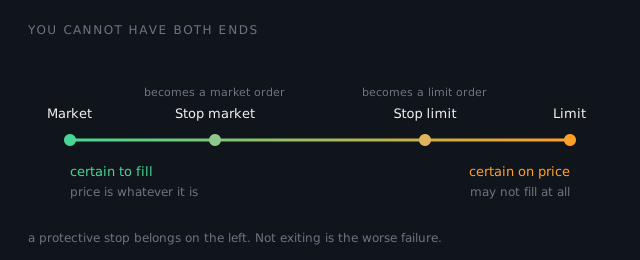
Every order type trades between two things you cannot have at once: certainty that you get filled, and certainty about the price. None of them promises both, and none of them promises either absolutely.
| Order | Protects | Leaves you exposed to |
|---|---|---|
| Market | Getting filled. It is the order type that prioritises execution above all else. | The price. In a fast market the fill can be materially worse than the one you saw. |
| Limit | Your price. If it fills, it fills at your limit or better. | Not filling, or filling partly. Price can touch your limit and leave without you if the queue ahead absorbed it. |
| Stop market | Getting out once the trigger trades. On the trigger it becomes a market order. | Slippage. NinjaTrader's own documentation puts it plainly: stop orders "increase your chances of getting filled at a particular price, but are not guaranteed because they are still ultimately market orders". |
| Stop limit | Your exit price. On the trigger it becomes a limit order, so you never exit worse than the limit. | Not exiting at all. If price runs past the limit the order stays working and the position stays open. |
That last row is the one that hurts. A stop limit placed to avoid a bad fill can leave you holding a losing position while price keeps going, which is the exact scenario the stop existed to prevent. It converts an unknown-size loss into a possibly much larger one in exchange for protection against slippage. For a protective stop, that is usually the wrong side of the trade to be on.
Slippage is not a malfunction
A stop market order fills at the best price available when it triggers. If the book is thin at that moment, that price can be several ticks past your trigger. Nothing has gone wrong. You asked to be out, and out is what you got.
It is worth knowing what this costs you in money rather than ticks. Two ticks of slippage on ES is $25 a contract, on NQ it is $10, and on crude it is $20. Multiply by how often you are stopped out and it stops being a rounding error. The tick value guide has the figures for twelve contracts.
Where the trigger sits matters
A stop is triggered by price trading at your level, so a stop placed exactly at an obvious number is a stop placed where a great many other stops already are. That is not a conspiracy, it is just liquidity: a cluster of resting stops is a pool of market orders waiting to fire, and pools like that get reached.
The mechanical point, separate from any view about how to trade: your stop should sit where the idea is wrong, not where the round number is. If those are the same place, the stop needs more room, which means fewer contracts. That is what the position size calculator is for.
Bracket orders and the one thing to check
Most platforms let you attach a stop and a target to an entry so all three go in together. This is worth using, for a reason that has nothing to do with the orders themselves: it removes the moment between getting filled and deciding on a stop, and that moment is where a planned trade turns into an unplanned one.
The thing to verify is what happens when one side fills. The two exits should be linked so that filling one cancels the other. If they are not, a target fill can leave a live stop order behind, which is now not a stop at all but an order to open a fresh position in the opposite direction.
Check this on a simulated account, not a live one. Every claim above is about how orders behave, and behaviour is testable. Place the orders, fill them, and watch what your platform actually does with the other side. It takes ten minutes and it is worth more than reading about it, this page included.
Then what
The execution side of your results is visible in your own exports. The Trade Lab compares each loss against your own typical loss on that instrument and flags the ones far outside it.
What it cannot do is tell you why. A stop that was never placed, a stop that was widened, slippage on a fast trigger and a deliberate decision to hold all produce the same row in a CSV. The export can show you the outlier; only you know which of those it was. That is the useful division of labour, and claiming more of it than that would be inventing a cause from a number.
Sources checked
- NinjaTrader 8 Help Guide, Order Types, the source of the quoted line that stop orders are "not guaranteed because they are still ultimately market orders", and that a stop limit "might not be filled if the limit price is never reached".