How to use Market Replay in NinjaTrader 8
Market Replay plays a recorded session back through NinjaTrader as if it were live, so you can practise on a past NQ morning at your own speed. It takes three things in order: the data, the Playback connection, and the Playback control. Here is each step, and the ways a replay is kinder to you than the live market.
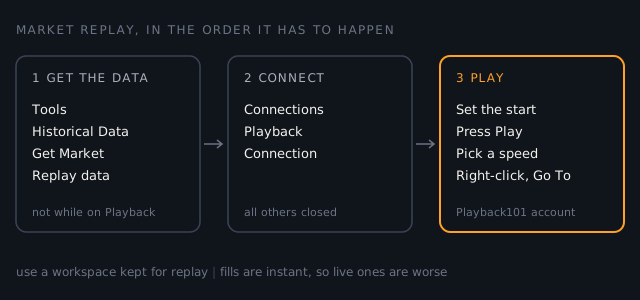
Before you start: a workspace kept for replay
Playback takes over NinjaTrader. You have to close every other connection before you connect to it, so it is not something to run beside a live session. NinjaTrader's help guide also recommends saving and closing your live workspaces and opening one kept for replay, so that drawings and settings on your live charts are not touched by practice.
Get the replay data
Replay needs data recorded in NinjaTrader's own format, which holds every price change and the market depth beside it, in order. You can download it or record it yourself.
- Make sure you are not connected to Playback. NinjaTrader will not download replay data while it is.
- In the Control Center, open Tools, then Historical Data.
- Expand Get Market Replay data, choose the instrument and the date, and press OK.
- Leave the window open until the download finishes. Its progress shows in the lower right corner, and closing the window cancels it.
NinjaTrader offers a limited amount of replay data free, for the most common instruments only. If the download will not start, check Tools, Options, Market Data: Enable market recording for playback has to be off while you download.
That same setting, switched on, is the other way to get data. With it
on, NinjaTrader records every instrument open in any window that is
receiving live data, and records market depth only where a Level II,
SuperDOM or FX Pro window is open for it. The files land in
Documents\NinjaTrader 8\db\replay, one folder per
contract.
Connect to Playback
- Disconnect from your live connection.
- In the Control Center, open Connections and choose Playback Connection.
- The Historical Data window opens first, so you can check what data you have and download more before you carry on.
- The Playback control appears. Orders you place now go to an account called Playback101.
Drive the Playback control
| Control | What it does |
|---|---|
| Playback type | Market Replay, or Historical, which replays tick data without market depth |
| Start and End | The dates at the two ends of the slider |
| Play | Starts the replay from where the slider sits |
| Slider | Picks the moment to start from. Dragging it during playback resets the account's trade history |
| Speed | Each click goes faster, up to Max, which runs as fast as the computer can |
| Go To | Right-click the control: jumps to a date and time you type, where data exists |
| Show Available Data | Right-click the control: lists the instruments you have replay data for, with begin and end times |
The right-click menu also sets how earlier days load. Playback from selected is the default and the fastest: earlier bars come from historical data and replay starts at the slider. Playback from start replays every day between the slider's ends, which is slower and is meant for testing a strategy.
Where a replay is kinder than the market
Replay is good practice for reading the tape and for the mechanics of your order entry. It flatters your results in four ways, all from NinjaTrader's own description of it:
- Orders fill at once. Playback101 processes orders immediately, with none of the internet delay the simulator adds, so your fills are better than any live account would give you.
- The screen redraws once a second. Orders and indicators still calculate tick by tick, but what you see moves in one-second steps.
- The sizes at the bid and ask are made up. During playback NinjaTrader sets them to 1, so anything that reads the size of the best bid or offer is reading a placeholder.
- History does not stay. The Playback101 account's trades reset when you disconnect and when you drag the slider. Write down what you want to keep before you do either.
So read a replay result as a practice result, in points or R, and expect the same trade to fill worse live.
Sources checked
- NinjaTrader 8 Help Guide, Playback Connection: Playback is chosen from the Connections menu, every other connection must be closed first, and the Historical Data window appears before it connects.
- NinjaTrader 8 Help Guide, Playback Set Up: the advice to use a workspace kept for Playback; downloading from Tools, Historical Data, Get Market Replay data; the free data limited to the most common instruments; no download while Playback is connected or while recording is on; and what the recorder records.
- NinjaTrader 8 Help Guide, Playback: the Playback control and its right-click menu, the two loading modes, Playback101 orders processed at once with no simulated latency, the screen updating once a second, bid and ask sizes set to 1, and the account history resetting on disconnect and when the slider is dragged.
- NinjaTrader 8 Help Guide, Data Files: replay files are kept in Documents\NinjaTrader 8\db\replay.
- NinjaTrader 8.1.6.0 as installed on our machine. Its menu and control names match the ones used here, Get Market Replay data, Enable market recording for playback, Playback Connection, Playback101, Go To and Show Available Data among them, and its replay folder holds one folder per contract.