Set the trading hours on an NQ chart in NinjaTrader 8
Every NQ chart in NinjaTrader has a trading hours template behind it, and the template decides where each day starts, which bars count as yesterday, and where anything that resets daily resets. Here is the template NQ and MNQ get by default, what NinjaTrader's RTH template really covers, and how to change templates or build your own.
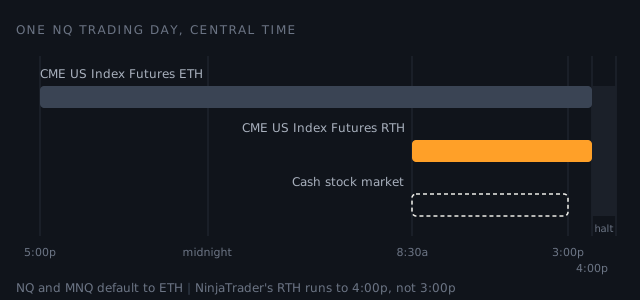
What an NQ chart uses unless you change it
A new chart's data series starts on <Use instrument settings>, which means the template the instrument itself names. For NQ and MNQ that is CME US Index Futures ETH: the whole Globex day, overnight included.
| Template | Each session, Central time | What it covers |
|---|---|---|
| CME US Index Futures ETH | 5:00pm to 4:00pm the next day, Sunday evening to Friday | The full futures day. Each session is dated by the day it ends on |
| CME US Index Futures RTH | 8:30am to 4:00pm, Monday to Friday | From the stock market's open to the futures' daily close |
NinjaTrader's RTH is not the cash session
The stock market closes at 3:00pm Central. NinjaTrader's RTH template for index futures runs to 4:00pm, the futures' daily close, so it keeps an extra hour. An RTH high on a NinjaTrader chart can be made in that hour, and a chart of the cash session would never show it. Neither is wrong. They are different days, and the trading hours guide explains why the futures trade on after the stocks stop.
That is the template as it stands in NinjaTrader 8.1.6 on our machine. NinjaTrader updates its templates from its own servers, so read yours before you trust a number here, ours included.
Change the template on a chart
- Select the chart and press Ctrl+F to open the Data Series window.
- Select the NQ series under Applied.
- Set Trading hours to the template you want.
- Press OK.
Two settings can overrule what you just did. If the chart was opened from a chart template, the trading hours saved in that template win over the data series. And Break at EOD, when it is on, cuts the last bar off at the end of the session even if it is not complete, so a 4-hour bar can close after 2.
Build a cash-session template
If you want a chart that matches the stock market's hours, make a template for it rather than editing NinjaTrader's own.
- In the Control Center, open Tools, then Trading Hours.
- Select CME US Index Futures RTH, press copy, and name the copy, for example NQ cash session. The copy keeps the original's holidays and time zone.
- Edit each weekday session so it ends at 3:00pm, leaving EOD ticked. Or remove them, add one for Monday, and right-click it for Add Monday Through Friday.
- Press Apply, then choose the new template on the chart as in the steps above.
A template you start from nothing needs holidays too: right-click the holidays grid and choose Load Holidays From Trading Hours to borrow them from another template.
Pick one and keep it
There is no correct template, only a consistent one. A level drawn under ETH and traded under RTH is a level from a different day, and so is any average or high that resets daily. Choose the hours you trade, put every NQ chart on them, and check the template before you trust a number that depends on where the day starts.
Sources checked
- NinjaTrader 8 Help Guide, Trading Hours: the Trading Hours window opens from Tools in the Control Center, and NinjaTrader keeps its predefined templates on its own data server.
- NinjaTrader 8 Help Guide, Using the Trading Hours window: where templates apply, copying a template, session definitions and the EOD mark, Add Monday through Friday, loading holidays from another template, and Apply.
- NinjaTrader 8 Help Guide, Working with Price Data: the Data Series window on Ctrl+F, its Trading Hours setting, a chart template's trading hours taking precedence, and Break at EOD.
- NinjaTrader 8 Help Guide, Saving Chart Defaults and Templates: a data series' session template defaults to <Use instrument settings>.
- NYSE, Holidays and Trading Hours: a core trading session of 9:30am to 4:00pm Eastern, which is 8:30am to 3:00pm Central.
- NinjaTrader 8.1.6.0 as installed on our machine. NQ's and MNQ's instrument settings name CME US Index Futures ETH. Its template files, last updated 13 July 2026, set ETH at 5:00pm to 4:00pm and RTH at 8:30am to 4:00pm, both in Central time, and the window's own labels read Add Monday Through Friday and Load Holidays From Trading Hours.