Trading hours, and what a session template changes
Equity index futures trade nearly around the clock, which means the word "day" has at least three meanings: the exchange's trading day, the regular session, and whatever your charting software has been told a day is. When those disagree, your indicators quietly compute something other than what you think.
The exchange day for equity index futures
ES, NQ, YM, RTY and their micros trade on CME Globex from Sunday 5:00pm Central through Friday 4:00pm Central, with a 60 minute halt each day from 4:00pm Central. In Eastern time that is a 6:00pm Sunday open and a 5:00pm to 6:00pm daily break.
The consequence that trips people is that the trading day starts the evening before the date it is named after. Monday's session begins on Sunday evening. A trade you take at 8:00pm on Tuesday belongs to Wednesday's trading day as far as the exchange is concerned.
| Window | Central | Eastern | What it is |
|---|---|---|---|
| Globex open | Sun 5:00pm | Sun 6:00pm | Start of the trading week |
| Daily halt | 4:00pm to 5:00pm | 5:00pm to 6:00pm | Maintenance break, Mon to Thu |
| Cash equities | 8:30am to 3:00pm | 9:30am to 4:00pm | The underlying stock market |
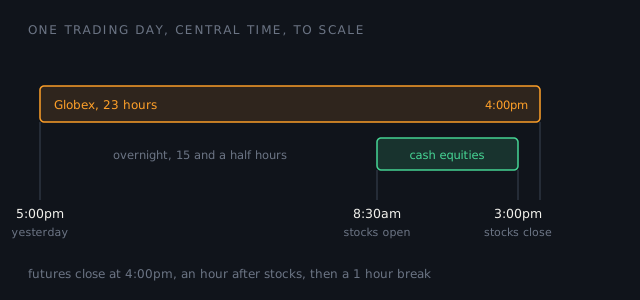
If you have read that the session ends at 3:15, that is out of date
Plenty of material still describes a 15 minute pause from 3:15 to 3:30pm Central, and a regular session ending at 3:15. It does not exist any more. CME eliminated that pause for the affected equity index futures and options effective Sunday 27 June 2021, and the notice says what replaced it in one line: the products "will trade from Sunday-Friday, 5pm-4pm CT, daily, with a 4pm-5pm CT maintenance period".
This matters beyond trivia, because a stale 3:15 in your head produces a stale expectation of when liquidity leaves.
Why the futures session outlasts the cash session
The stock market closes at 3:00pm Central. Equity index futures keep trading for a further hour, until the Globex day ends at 4:00pm Central. That hour is thinner than what came before it and it is still a real market, which is a combination worth respecting: the same size that moved price one tick at midday can move it several here.
"Regular trading hours" is a setting, not an exchange fact
The exchange publishes one schedule, the one above. RTH is not part of it. It is a session template your charting software applies, and different platforms and different templates draw the boundary in different places, which is exactly why two people can disagree about yesterday's high while both reading correctly.
So do not take an RTH figure from an article, this one included. Open your own platform, look at which session template the chart is using, and read the times it defines. That is the only RTH that affects what you see.
What a session template actually changes
A session template tells your platform where one day ends and the next begins. Changing it does not change the data, it changes what every calculation built on top of "today" resolves to:
- Bar boundaries. Daily bars, and the first bar of any intraday series, form where the session says they do.
- Daily high and low. Including "yesterday's high", which is a level a great many people draw and not all of them are drawing the same one.
- VWAP. It anchors at session start. A VWAP anchored at 5:00pm the previous evening and one anchored at 8:30am are different lines, and the difference is largest exactly when the overnight moved.
- Anything that resets daily. Opening range tools, daily pivots, session volume profiles.
There is no correct template, only a consistent one. Whether you anchor to the full Globex day or to the regular session is a choice about what you are measuring. What is not optional is that your chart, your indicators and your notes all use the same one. A level drawn under one template and traded under another is a level taken from a different market.
How this shows up in your records
Your export carries entry timestamps, and anything that groups those into days has to pick a boundary. The Trade Lab groups on the calendar date of the entry, in your machine's local time. That is the right answer for the overwhelming majority of sessions and the wrong one for a specific case worth naming: if you trade the overnight, a position opened at 11:30pm and another opened at 12:30am land in two different sessions even though you would call them one sitting.
If that is how you trade, read the Lab's per session numbers with that in mind. It is a limitation of splitting on the calendar, not a bug, and saying so is better than quietly producing a debrief that splits your night in half without mentioning it.
Hour by hour is where this gets useful
Once the timestamps are in, the interesting question is not what the session hours are but which of them your trading actually worked in. That is a measurement, not an opinion.
Two different things in the Lab, and it is worth knowing which is which. The best and weakest hour line describes the session in front of it, and prints the trade count behind each so you can see how thin the claim is. The Timing score is withheld entirely until at least three trading hours are represented, because one green hour is not a time-of-day edge. Read the first as an observation and the second as a judgment.
Sources checked
- CME Group notice, 21 June 2021, eliminates the 3:15 to 3:30pm Central pause effective 27 June 2021 and states the replacement schedule of 5pm to 4pm Central with a 4pm to 5pm maintenance period.
Related guides
Set the trading hours on an NQ chart in NinjaTrader 8
The clicks: the template NQ gets by default, what NinjaTrader's RTH covers, and how to change it.
How to read your performance report
Profit factor, expectancy, breakeven win rate and drawdown. What each one tells you, and what no summary can see.
Rollover and the front month
Why there is more than one ES, what happens on the day everyone leaves, and why your charts appear to gap.